
Artificial Intelligence is powerful. It accelerates development, generates scripts, and reduces operational effort.
But this article is not about replacing humans with AI.
It’s about how deep understanding of your system — combined with AI — can directly save you money. And sometimes, quite a lot.
When Deep Observability Really Matters
If you don’t have unlimited money and want your business to scale sustainably, you must understand:
- What each component does
- Why it exists
- How it behaves over time
- What exactly you’re paying for
The internet is full of advice about AWS cost optimization. Almost every article repeats the same checklist:
- Optimize compute
- Pick the correct instance type
- Right-size your database
- Turn on autoscaling
- Buy reserved instances
That’s not wrong — but it’s generic. What you rarely see are practical examples where understanding business logic and system behavior makes the real difference.
Let me show you a real example.
The Problem: Redis Evictions
We were using AWS ElastiCache (Redis) in production. We configured alarms for:
- Memory utilization
- CPU utilization
- Evictions
Our eviction policy was allkeys-lru, meaning:
When memory is full, the least recently used keys are evicted.
We initially provisioned:
| Instance Type | Memory | vCPU | Network | Architecture |
|---|---|---|---|---|
| cache.m6g.large | 13.07 GiB | 2 | Up to 10 Gbps | Graviton2 |
Everything worked perfectly — until the first eviction alarm.
First Reaction: Scale Up
Memory was clearly insufficient, so we scaled up to:
| Instance Type | Memory | vCPU | Network | Architecture |
|---|---|---|---|---|
| cache.m6g.xlarge | 26.32 GiB | 4 | Up to 10 Gbps | Graviton2 |
Cost doubled. The system stabilized:
- Cache hit rate: ~90%
- No significant traffic changes
- No new major clients
Everything seemed fine — for two weeks. Then eviction alarms returned.
Something Was Wrong
Memory usage was constantly growing.
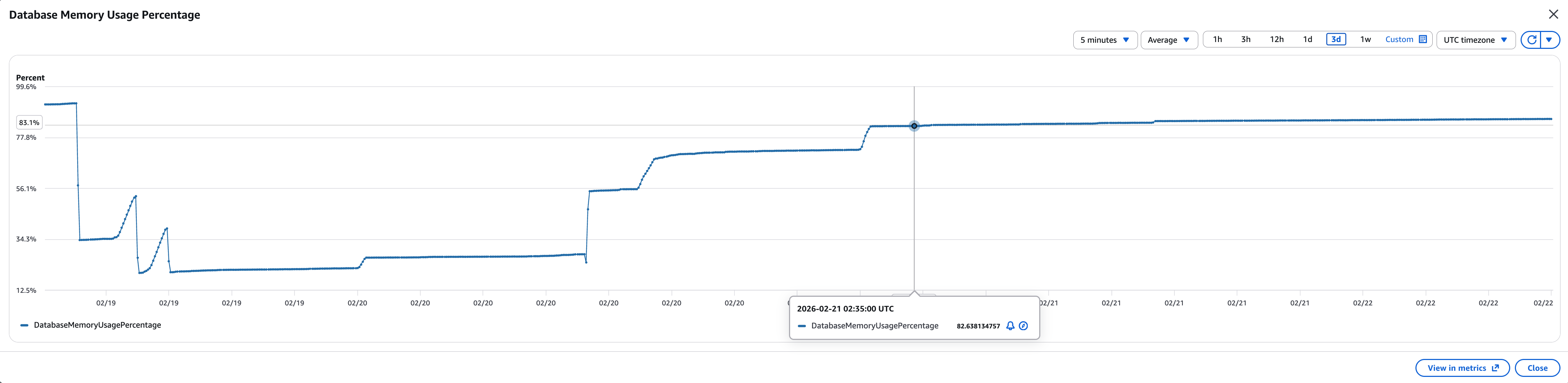
That should not happen in a healthy cache. So I asked the development team:
What is the TTL of our Redis keys?
The answer:
Indefinitely.
Even with no significant traffic increase, memory had doubled again. That meant one thing: something was accumulating.
Investigation Phase
We created a ticket and isolated the environment:
- Spin up an additional container
- Used sticky sessions (to avoid impacting production load)
- Installed Redis CLI
- Counted all keys
Result:
| |
That’s a lot. Then we checked the top keys and noticed a pattern:
| |
Example:
| |
Every key contained a semantic version.
Root Cause
We discovered:
- Backend uses only the current release version
- Old release keys remain in Redis
- They are never reused
- They are never deleted
- TTL = infinite
So every deployment added a new full layer of cache:
| |
Old versions just sit there consuming memory. This was not a scaling problem — it was a logic problem. And no autoscaling would fix it.
Possible Solutions
We evaluated options:
| Option | Description | Problem |
|---|---|---|
| 1 | Purge entire cache now | Problem returns in 1 month |
| 2 | Ignore eviction alarms | Lose control & observability |
| 3 | Flush cache before deployment | Causes DB spike |
| 4 | Clean old keys after deployment | Controlled & version-aware |
We chose Option 4.
Constraints
We needed a solution that:
- Does not block deployment
- Does not run inside the main application container
- Deletes only old version keys
- Is fast
First Attempt (Too Slow)
| |
It worked, but:
- ⏱ 1–2 hours execution time
- Operationally unacceptable
Smarter Approach: Lua Inside Redis
We discovered we could use a Lua script executed directly inside Redis.
Problem:
- No one in the team knew Lua
- Learning it would take 1–2 days
- Would we use it again? Probably not
Instead of spending days learning syntax, we used AI to generate the Lua script in 5 minutes. Tested it.
Results:
- Stage: ~7 minutes
- Production: ~15 minutes
Clean. Controlled. Version-aware. Exactly what we needed.
Deployment Architecture
Final workflow:
After deploying a new version using a Blue/Green strategy, we run a canary verification to ensure stability. Once everything is confirmed healthy, a separate cleanup task is triggered. This task executes a Lua script inside Redis to remove outdated versioned keys — keeping only the current release cache and preventing unnecessary memory growth.
The Result
Since we stopped storing old cache, we scaled Redis back down:
| Before | After |
|---|---|
| cache.m6g.xlarge | cache.m6g.large |
- Cost reduced by 50%
- Cache hit rate remained stable (~90%)
- Operational performance unchanged
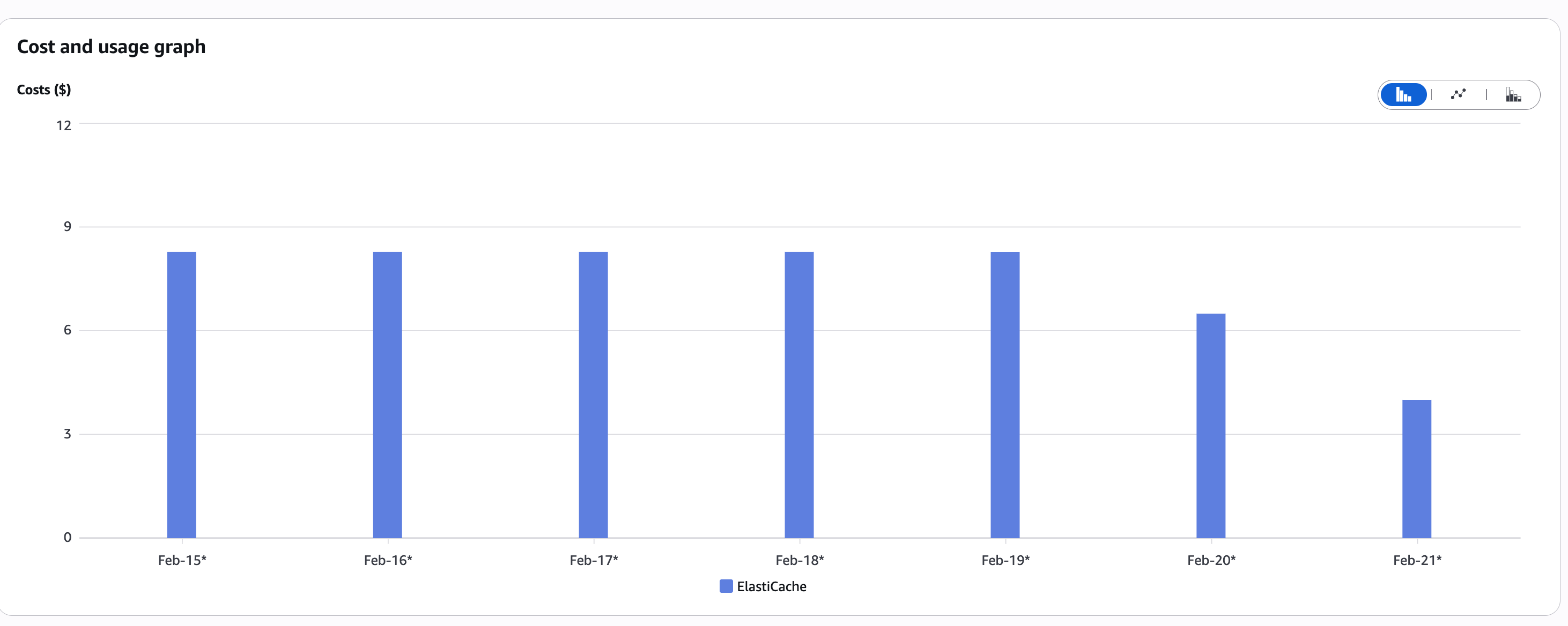
Financial Impact
Across environments:
- Monthly cost: $500
- Yearly: $500 × 12 = $6,000
After optimization:
- $3,000 per year
Saved: $3,000 annually from one logical insight.
No new infrastructure. No complex redesign. No overengineering. Just understanding.
Key Takeaways
1. Work as One Team
Ask questions. Challenge assumptions. Brainstorm together.
2. Understand End-to-End Flow
Scaling is not always the answer. Sometimes the issue is architectural.
3. Don’t Be Afraid to Use AI
AI wrote the Lua script. Human reasoning found the real problem. That’s the right balance.
4. Use Community Knowledge
Forums (Reddit, StackOverflow) are gold.
5. Stay Curious
Even if it takes 1–2 extra hours to deeply understand something — it might save thousands.
Final Thought
AI can generate scripts. But only a human who understands the business logic can ask:
“Why is memory constantly growing?”
Technology scales. AI accelerates. But mindset saves money.