Recently, a client reported a frustrating issue: their web application was intermittently throwing HTTP 503 Service Unavailable errors. Hitting refresh fixed it—though not every time. The issue occurred randomly, affected only a subset of users, and was impossible to reproduce in development.
When 503 errors strike, the default assumption is that the backend server is crashing. But in this case, the backend was completely healthy with zero application errors.
To find the root cause, we had to look away from the origin server and dive into the mechanics of AWS CloudFront and Lambda@Edge.
Step 1: How AWS CloudFront Handles a User Request
To understand what went wrong, let’s trace what actually happens when a user visits a CloudFront-backed website:
- DNS & Edge Routing: The user enters a URL. CloudFront uses DNS to determine the user’s location and routes the connection to the closest Point of Presence (POP), or Edge location.
- Security & WAF: The POP handles security checks, load balancing, and applies AWS WAF rules to block web attacks before any content rules run.
- The First Cache Check (POP): CloudFront checks if the requested content is already cached locally at the POP. If it’s a cache hit, the response returns instantly.
- Regional Edge Cache (REC): On a cache miss, the request goes to a Regional Edge Cache (REC)—a larger caching layer that acts as a bridge between localized Edge locations and the origin.
- Origin Fetch & Edge Functions: If the REC doesn’t have the file either, CloudFront fetches it from the origin (e.g., an S3 bucket). Once the origin responds, Lambda@Edge origin-response code triggers at the REC to customize or modify the payload before caching and returning it to the user.
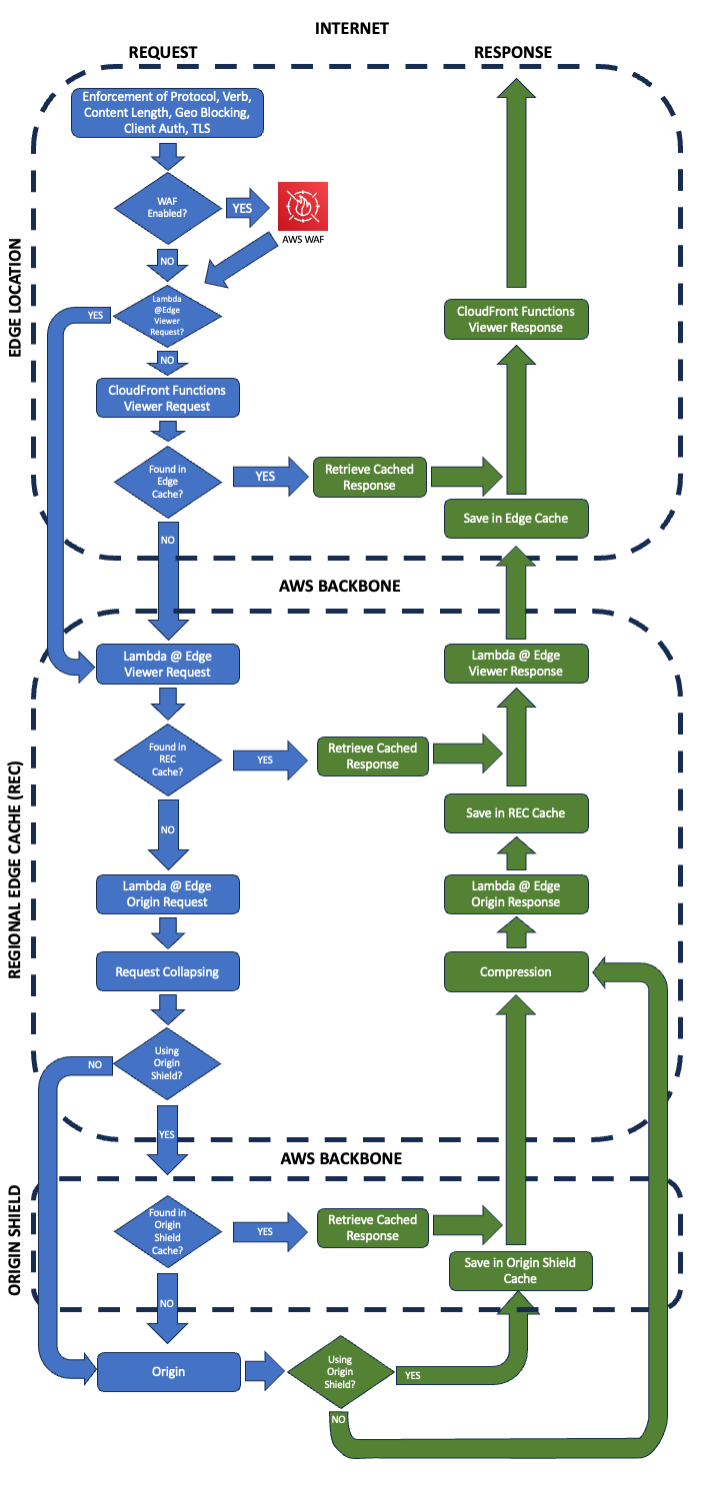
Figure 1. CloudFront request flow. Source: AWS, Charting the life of an Amazon CloudFront request. [1]
Step 2: The Regional Clue & The Execution Path
Looking at CloudFront’s Execution Errors view, a distinct pattern emerged: the 503 errors were occurring almost exclusively for users in the Asia Pacific (Tokyo) region.
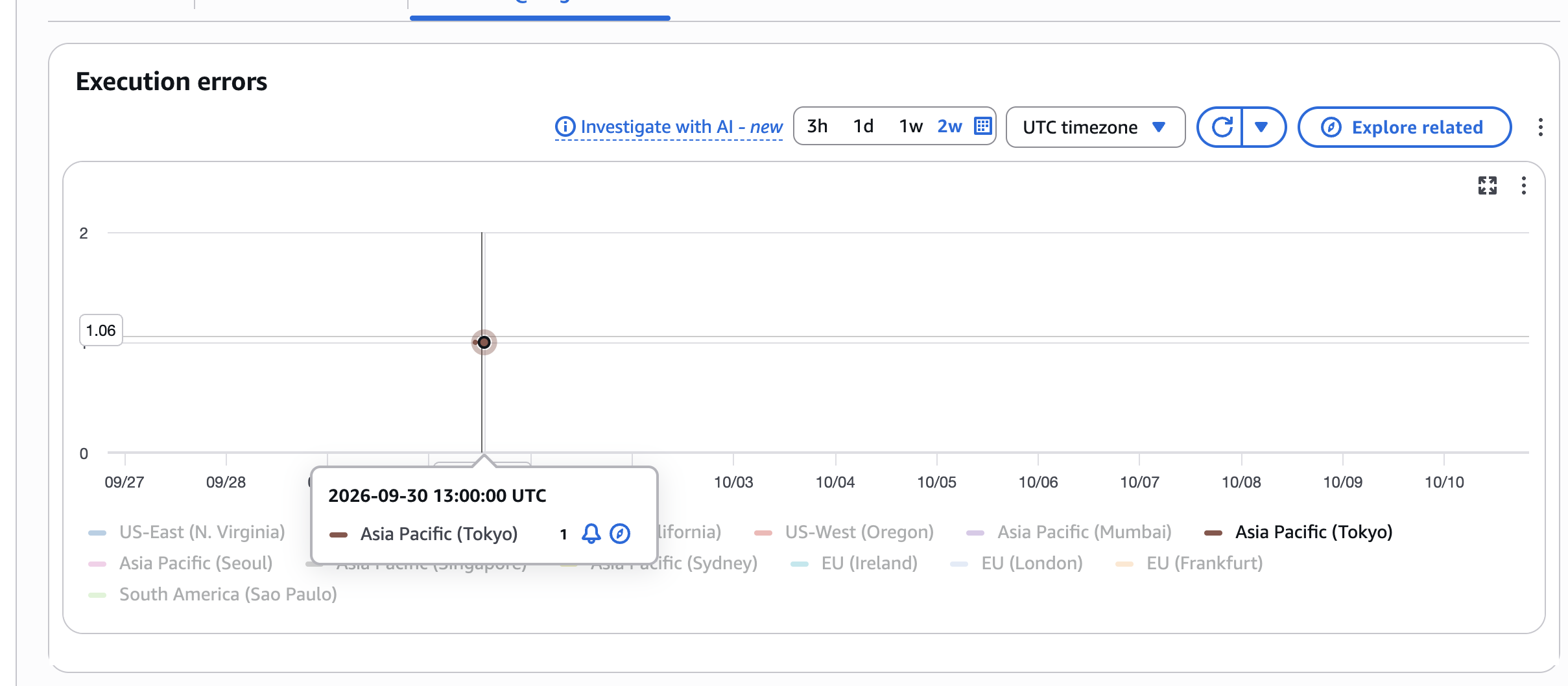
Figure 2. CloudFront execution errors by Region, with a Tokyo data point highlighted.
Checking the execution metrics revealed that the code wasn’t throwing unhandled exceptions; rather, invocations were hitting a 3-second execution timeout.
Why was this function timing out specifically in Asia Pacific?
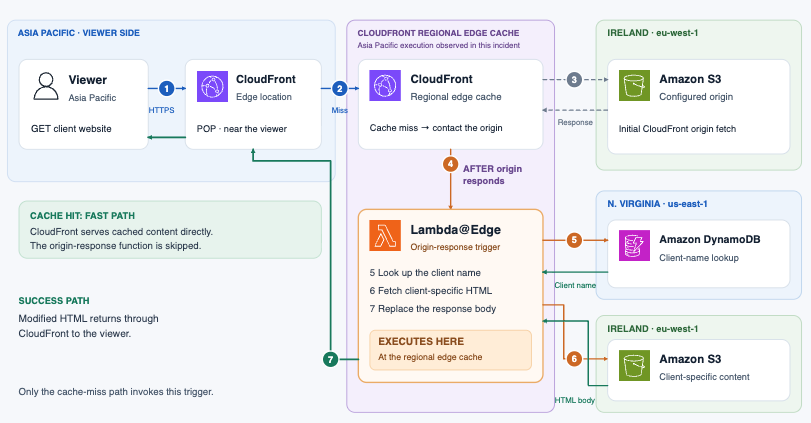
To build tenant-specific dynamic HTML, our origin-response Lambda@Edge function executed the following steps:
- CloudFront fetched the base file from an S3 bucket in Ireland (
eu-west-1). - The Lambda@Edge function triggered at the Asia Pacific REC.
- Because origin-response functions cannot read the origin response body directly, the function had to make its own external API call to a DynamoDB database in Northern Virginia (
us-east-1) to look up tenant details. - It then made a second network call back to S3 in Ireland (
eu-west-1) to retrieve the client-specific HTML. - Finally, it replaced the body and returned the modified response.

Figure 3. The incident request path, spanning Asia Pacific, Northern Virginia, and Ireland.
Step 3: Why it Failed (and Why Refreshing “Fixed” It)
When code running at an edge location in Asia has to make sequential network round-trips to North America and Europe, latency adds up fast.
Two main factors triggered the 503 timeout:
- Cross-Globe Network Latency: Sequential HTTP requests traversing Asia → US → Europe created significant overhead.
- Lambda Cold Starts: Because traffic in the Asia region was lower, the Lambda@Edge function went cold more often. A cold start adds initialization overhead. Combine a cold start with long cross-region network calls, and execution exceeded the 3-second timeout budget.
When users refreshed the page, the Lambda environment was already “warm,” eliminating the cold start delay and allowing the function to finish within the 3-second limit.
Key Lessons & Takeaways
As Cloud Architects, unexpected edge behavior is often a reminder to trace dependencies from the actual execution point.
Here are the key takeaways and immediate improvements from this incident:
- Initialize SDK Clients Outside the Handler: Moving the AWS S3 client setup outside the function handler prevents unnecessary re-initialization on warm executions. [5]
- Set Up Region-Specific Edge Alerts: Always monitor execution errors and timeouts specifically at the edge layer, rather than relying solely on origin health checks. [3]
- Mind the Execution Radius: If an edge function relies on remote databases or buckets across the globe, sequence round-trips carefully—or consider placing edge-side data closer to the execution layer using global tables or local caching.
- Use DynamoDB Global Tables Close to the User: Replicating the tenant table with DynamoDB Global Tables means the Asia Pacific invocation reads from a local replica instead of making a round-trip to Northern Virginia. That removes one of the two cross-region hops entirely and cuts the biggest chunk of latency from the execution path. [6]
- Replicate the HTML Objects Regionally: The second hop—fetching client-specific HTML from S3 in Ireland—can be shortened the same way. Use S3 Cross-Region Replication (or an origin closer to the edge) so the function retrieves the payload from a nearby bucket rather than crossing the globe a second time. [7]
- Parallelize Independent Calls: The DynamoDB lookup and the S3 fetch are sequential in our implementation, but if any dependencies are independent, running them concurrently keeps total latency closer to the slowest single call instead of the sum of both.
- Raise the Timeout as a Short-Term Buffer: Increasing the 3-second limit buys headroom while you implement the architectural fixes above, but treat it as a stopgap—it hides the latency rather than removing it.